Project Management · by Alshival.Ai
Your work.
Connected.
The board, the context, and a helping hand. Bring your team’s tasks, notes, and resources into one workspace—with Alshival alongside you.
From conversation to progress
Ask. Create. Keep moving.
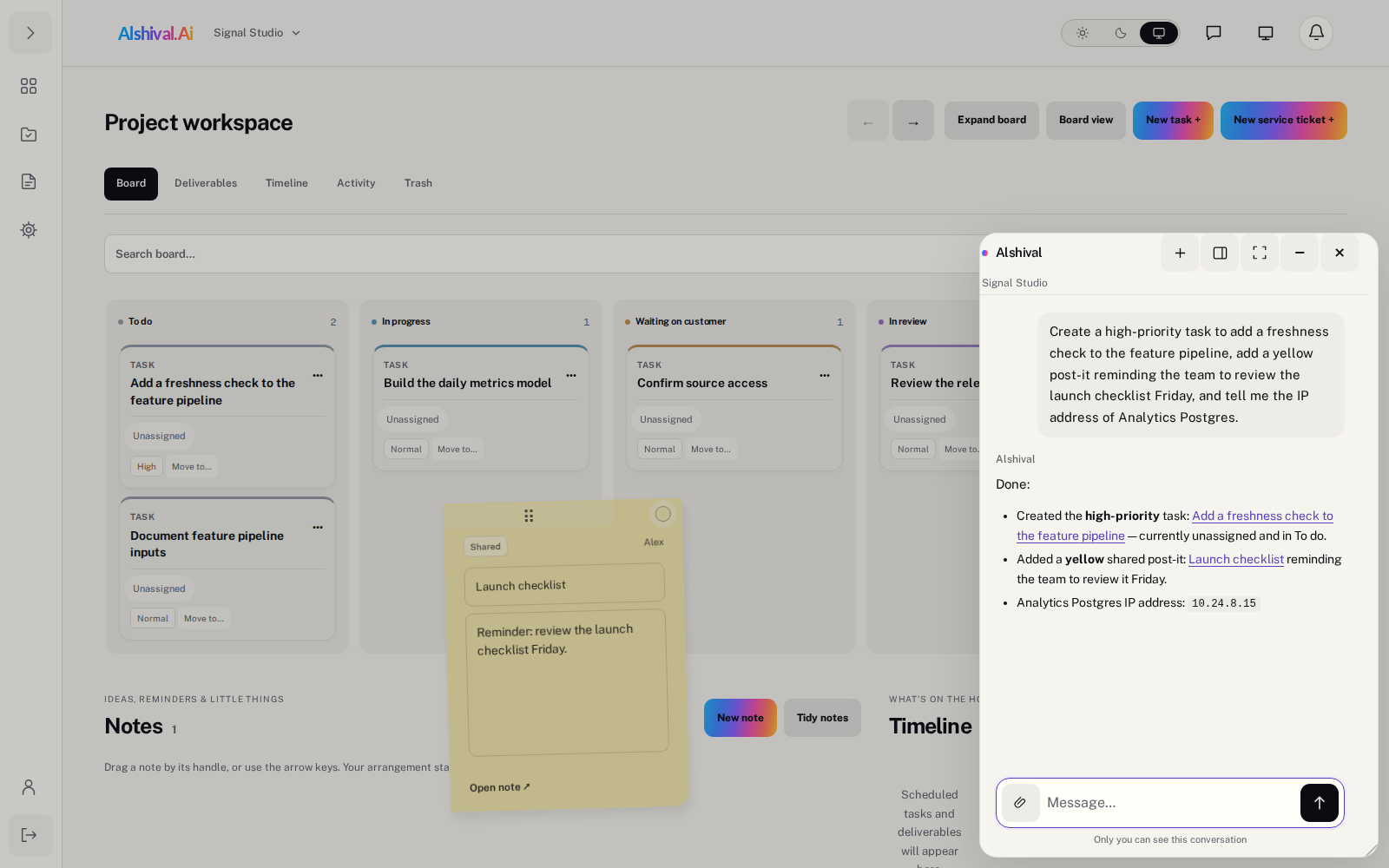
“Add a task, leave the team a reminder, and find our database’s IP address.” Alshival works with the information and actions you’re authorized to use.

01 · Plan together
A place for the work.
Shared boards, tasks, comments, timelines, and post-it notes. Keep decisions close to the work without seat, task, or note limits.
02 · Keep the context
Resources, in reach.
Record the databases, servers, repositories, and other resources your team depends on. Ask Alshival to find the details you’ve shared.
03 · Connect your tools
Built to work together.
Use the REST API and MCP with workspace-specific or account-wide connections. Your permissions and plan allowances follow every request.
Clear plans. Room to grow.
Start with the work.
Choose your capacity.
Monthly USD pricing per workspace—not per person. Start on Free, then add integration capacity, Cloud Logs, or a persistent Neura environment.
Free
Try project collaboration and integrations.
$0 USD / month
per workspace
- Boards, tasks, post-it notes, and Alshival
- 1,000 API/MCP operations per month
- 2 connections · 5 resources
- Cloud LogsNot included
- Documents with a ready Neura runtimeNot included
- 5 requests/sec per workspace · 3 per key
Starter
More room for your projects and integrations.
$19 USD / month
per workspace
- Boards, tasks, post-it notes, and Alshival
- 50,000 API/MCP operations per month
- 5 connections · 50 resources
- Cloud LogsNot included
- Documents with a ready Neura runtimeNot included
- 20 requests/sec per workspace · 5 per key
Growth
Operational logging and higher-volume integrations.
$79 USD / month
per workspace
- Boards, tasks, post-it notes, and Alshival
- 500,000 API/MCP operations per month
- 25 connections · 500 resources
- Cloud Logs
- Documents with a ready Neura runtimeNot included
- 50 requests/sec per workspace · 10 per key
- 20 GB logs/month · 50 GB retained · 90 days
Neura
Growth plus a persistent hosted development environment.
$100 USD / month
per workspace
- Boards, tasks, post-it notes, and Alshival
- 500,000 API/MCP operations per month
- 25 connections · 500 resources
- Cloud Logs
- Documents with a ready Neura runtime
- Persistent hosted Neura environment
- Bring your own OpenAI credentials; usage is billed separately
- Semantic document searchComing soon
- 50 requests/sec per workspace · 10 per key
- 20 GB logs/month · 50 GB retained · 90 days
- 25 GB Documents working set
Custom
Capacity and services tailored to your team.
Let’s talk
Contact us- Boards, tasks, post-it notes, and Alshival
- Contract-specific limits, services, and support
- Documents only when your agreement includes NeuraNot included
Hard usage caps do not create automatic overage charges. Applicable taxes are shown before payment. Custom terms are agreed separately.
When your work needs an environment
Meet Neura.
Standard Alshival helps you work with your portal’s information and tools. Neura adds a persistent hosted container environment for code, terminal access, and Documents.
Your environment. Your context.
Documents become available when your Neura runtime is ready. Bring your own OpenAI credentials; model usage is separate from the workspace subscription.
Capacity is checked before checkout. If no space is available, choose Growth or explicitly join the paid Neura waitlist with Growth access while you wait.
Semantic document search and document Q&A are coming soon—not included as available capabilities today.
A few useful details
Before you begin.
What can I do on Free?
Use boards, tasks, post-it notes, resource inventory, Alshival, and limited API/MCP access. The cards above show the current limits. Cloud Logs and Documents are not included.
Is pricing per person or per workspace?
Per workspace. Core collaboration has no seat, task, note, or board-history limits. You may own one Free workspace; invited memberships do not count against that limit. Additional new workspaces require a paid plan.
Where do I manage API and MCP connections?
In Account Settings → API & MCP. Create account-wide or workspace-specific connections there. Workspace Services shows your current plan and upgrade options.
When do plan changes take effect?
Paid upgrades take effect after the prorated payment succeeds. Downgrades and cancellation take effect when existing paid coverage ends. If you do not renew, your activated workspace returns to Free; existing workspaces and records are not deleted.
What happens if Neura is full?
We tell you before collecting payment. You can choose Growth instead or review and accept the paid waitlist. The review shows the initial payment, Growth renewal price while waiting, premium credit, and refund options. Neura and Documents stay unavailable until your runtime is ready.
What happens to my Neura environment after cancellation?
At the paid-through boundary, execution and writes stop. You have 90 days of portal read/export/delete access. After advance notices, the entire hosted environment and captured document content are permanently deleted. Renew before cleanup starts to restore the retained environment. Billing and project records remain.
Are AI tokens included?
No paid AI-token bundle is included. Neura uses your own OpenAI credentials, and provider usage is billed separately. Standard Alshival remains subject to its existing assistant safeguards.
Need a tailored plan?
Choose Custom to start a verified consultation about your limits, services, support, and capacity. Documents are included only when the agreement includes Neura.